My share of our Cursor bill at work was running USD $5,000 a month (I was a heavy, heavy user). I was juggling three or four big projects at once and getting five to ten times what I'd normally get done without AI, mostly because I could run them side by side. The value was there, but I had a theory we could get the same work for a lot less.
The idea was to let the big boy models, like Claude, do the planning and blueprints, then hand the grunt work of writing code to a free AI model that anyone can download and run on their own hardware. We had a spare M1 Mac mini with 16 GB of memory sitting around, so I convinced my boss to let me try it. If it worked on the M1, it would justify a Mac Studio with far more memory. When I priced them, that was CAD $4,999 for 64 GB and about $7,500 for 128 GB, and if the idea cut my bill in half, even the bigger one would pay for itself within three months.
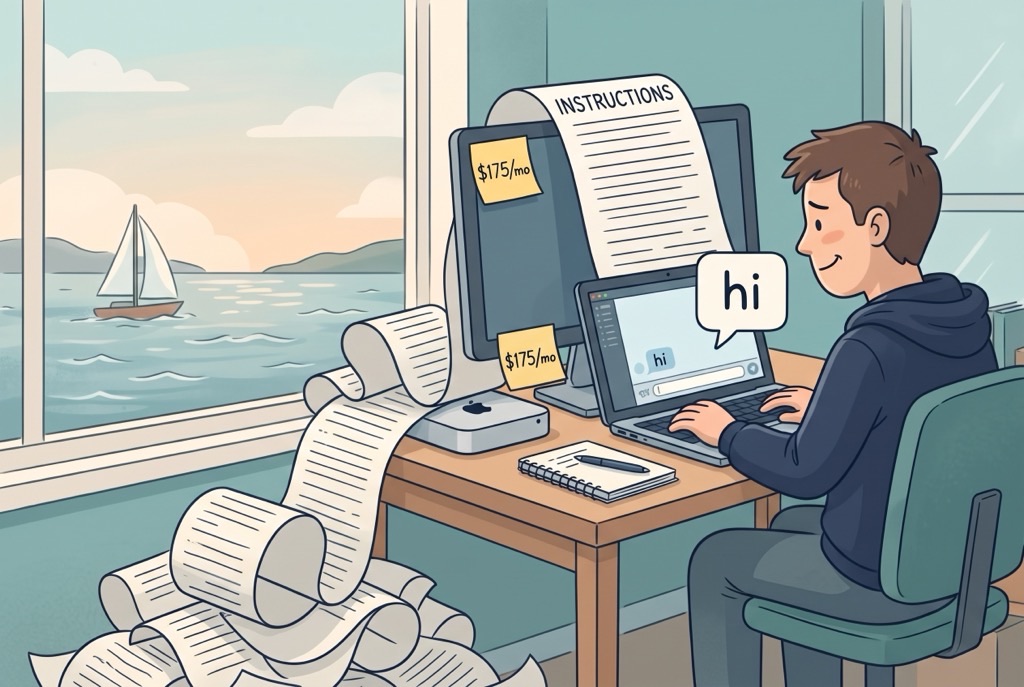
After a day or two of setup and testing, the model wasn't cutting it, because the coding assistant sent more text with every request than the M1 could hold or read in time. Around the same time, an acquisition of Cursor led us to rethink our alliances, and we moved to Claude Code, Anthropic's own coding tool. On Claude's own plan, my personal (well, work personal) account now does the same work for about USD $175 a month, and that ended the case for the Mac Studio. Well, for now.
If you're pricing an Nvidia graphics card or a bigger Mac to run your own AI and stop paying for Claude, start with what the M1's logs show. A 16 GB Mac mini can run a free coding model, but it couldn't stand in for Claude inside a coding assistant. Below is what it recorded, how much memory a local model needs beyond its download size, why the cost maths changed, and the one job where a small machine might still earn its keep.
The setup: Ollama and Cline on a spare M1 Mac mini
The Mac mini ran a free coding AI using a tool called Ollama, and my main computer sent it work through Cline, an AI coding assistant. The setup had four parts:
- An M1 Mac mini with 16 GB of memory. I closed everything that used memory and set it to run headless (with no screen attached) and never sleep.
- Ollama, a free tool that runs large language models (LLMs, the kind of AI behind ChatGPT and Claude) on your own machine and shares them with other computers on your network.
- Two free coding models from Alibaba's Qwen family: Qwen2.5-Coder in 7B and 14B sizes. The number is the model's size, in billions of settings it learned during training. Bigger models are smarter but need more memory.
- Cline, an AI coding assistant that runs inside VS Code, a free app programmers write code in. I pointed it at the Mac mini instead of a paid AI service.
AI models read and write in tokens, which are chunks of text. Anthropic puts a token at about 3.5 characters of English for its earlier Claude models, and the size varies from model to model. A model's context window is how much text it can hold in mind at once, counted in tokens. I set the 7B model's window to 16,000 tokens and the 14B's to 8,000, because the bigger model left less room on the machine for anything else.
Why a 16 GB Mac mini couldn't keep up
Coding assistants send their full instructions with every message. Mine sent nearly 60,000 tokens with a one-word "hi," and the model could hold 16,000.
If you're wondering how "hi" turns into 60,000 tokens, which is tens of thousands of words, the "hi" was the smallest part. Cline sends its own built-in instructions every time. My projects added rules on top so the AI would follow our skills and expectations, like planning before it builds and checking its own work. Those rules are a big reason Claude does good work for us, and they take up space in every request. The M1 didn't have that space.
Ollama's log on the M1 recorded what happened next:
- With room for 16,000 tokens, Ollama kept about 8,000 of what Cline sent and threw the rest away. The only warning was a line in Ollama's log file.
- With most of its instructions gone, the model answered "Hello! How can I assist you today?" That's a plain chatbot greeting from a model that no longer knew it was supposed to be writing code.
- With room for 32,000 tokens, Ollama kept about 16,000. The M1 read them at about 110 tokens a second. Cline gives up if there's no answer within two minutes, and it gave up three-quarters of the way through the reading.
- At that speed, reading everything Cline sent would take around nine minutes before the model wrote a single word. After that, it wrote at about 11 tokens a second.
- In its one complete answer, on a small test project, it suggested reading three files that don't exist.
How much memory a local LLM needs
A model's download size is only part of the memory it needs. The text it holds takes memory too, and so does each extra request running at once.
Memory works like counter space in a kitchen. The model is the cook, who takes up the same space every time, and the text it's holding is the recipe spread out beside them. A longer recipe needs more counter, and a second cook working at the same time needs room for their own.
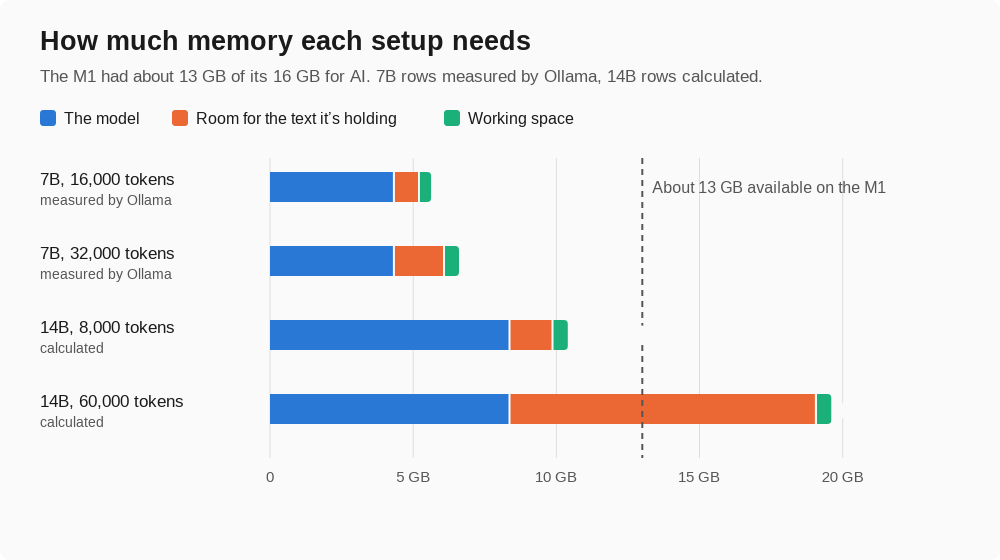
Ollama prints a memory breakdown every time it loads a model. The first two rows below are the M1's own numbers, and the last two are my arithmetic from the 14B model's published specs. Of the M1's 16 GB, about 13 GB was available for AI work.
| Setup | The model | Room for the text it's holding | Total |
|---|---|---|---|
| 7B, 16,000 tokens (measured) | 4.4 GB | 0.9 GB | 5.6 GB |
| 7B, 32,000 tokens (measured) | 4.4 GB | 1.8 GB | 6.6 GB |
| 14B, 8,000 tokens (calculated) | 8.4 GB | 1.5 GB | about 10.4 GB |
| 14B, the full 60,000 tokens (calculated) | 8.4 GB | 10.7 GB | about 20 GB |
Each total includes about half a gigabyte of working space. If you're buying hardware, the table points to three things:
- Budget memory for the text the model holds as well as the model itself. Every 16,000 tokens of room cost about 0.9 GB on the 7B and about 3 GB on the 14B.
- Running two requests at the same time needs room for two sets of text. Ollama's FAQ says the memory needed grows with the number of requests running at once times the room each one gets.
- The same maths applies to the memory on an Nvidia graphics card. On cards with less than 24 GB, Ollama starts with room for only about 4,000 tokens unless you change the setting, which is far less than a coding assistant sends.
Memory wasn't the only problem. The 7B could have held everything Cline sent in about 8 GB, but it was only built to handle 32,000 tokens, and reading that much would take around nine minutes. More memory lets you run a bigger model with more room, but it doesn't make a small chip read any faster.
A $175 plan made the Mac Studio hard to justify
Saving half of my USD $5,000 monthly share would have paid off even the 128 GB Mac Studio within three months. Against a $175 plan, it would take years.
At USD $175 a month, roughly CAD $240, the 64 GB Mac Studio would take close to two years to pay for itself, and the 128 GB about two and a half. That's if it replaced the whole plan, and it never would have. The theory always had Claude doing the planning, so the local machine was only going to save part of a bill that was now $175.
For most people chasing a Claude replacement, the cost of a machine that can play ball is bananas. I think that's somewhere in the 64 to 128 GB range for coding work, though I haven't tested it. It makes sense when keeping your work off the grid, on hardware you own, is the point, like data you can't send to a cloud service or a client who won't allow it.
Where an old Mac mini might still pay off: overnight testing
Small local models suit short, repeatable jobs with no deadline and private data. My next test is overnight checks of a Salesforce test system.
At work we try out changes in test copies of our clients' Salesforce systems before they go live, and I want to see whether the M1 can check them while we sleep. The plan has four steps:
- Playwright, a free tool that drives a web browser on its own, logs in to a test copy (never the live system) and clicks through each step of the test plan.
- After each step, it takes a screenshot.
- A small AI model that can read images, running on the Mac mini, compares the screenshot with the plan's wording, for example "the deal shows as Closed Won and there's no error message," and returns pass or fail with a reason.
- In the morning, a person reads the failures.
Three things make it worth trying on the M1:
- A screenshot is roughly 1,000 tokens, not 60,000. By my arithmetic, that's 20 to 30 seconds a check, or around 1,000 checks a night.
- Image-reading models that fit already exist. Qwen3-VL 8B is a 6.2 GB download.
- There's no per-use bill, and screenshots of client data never leave the machine.
Paid Salesforce testing tools already find buttons and fields using Salesforce's own records of how each page is built, and some already check screens visually. What's untested is a free local model judging each screen against the test plan's own words, on a machine that was gathering dust.
Two things could sink it:
- AI models used as judges pass broken results too often. In the AgentRewardBench study, "no judge achieves above 70% precision," meaning roughly 3 in 10 runs the judges passed had failed. In testing, passing something that's broken is the worst mistake there is.
- Small models are bad at running a browser themselves. Browser Use, which makes an AI browser tool, warns that small models "reach the page but often fail to finish the task," which is why Playwright does the clicking.
The test is 50 screenshots from a test system with no client data, half of them with planted problems like the wrong deal stage, an error message, or a missing row. It passes only if the model catches every planted problem.
What this test doesn't prove
This was a short experiment on one small machine, so read it as one data point about local AI.
- It was a day or two of setup and a handful of real tries.
- The models were from 2024. Newer small models have come out since, and I haven't tried them on this job.
- On a lighter test project with fewer rules, Cline sent about 5,000 tokens, and a reply still took more than two minutes. Trimming the rules would have helped with space, but the M1 would still have been slow.
- The savings came from paying for Claude differently, not from running anything locally.
- The overnight testing idea is a theory until the screenshot test runs.
Try it before you buy hardware
Check what your coding tool sends before you spend money on a bigger machine. If you already run Ollama, the first two steps take two minutes. If you don't, skip to step 3.
- Look for thrown-away text. On a Mac, open the Terminal app and run
grep "truncating input prompt" ~/.ollama/logs/server.log. It searches Ollama's log for the warning it writes when a request is too big and gets cut, and each line it finds is one of those. If you started Ollama yourself, the log is wherever you pointed it. - Check how much room you're getting. While a model is loaded, run
ollama psand look at theCONTEXTcolumn. That's how many tokens it can hold right now. - Do the payback maths with a big model before you buy. Paste this into Claude or ChatGPT:
"Here's my monthly AI bill and what I use it for: [paste]. Estimate how much of this work is routine coding a smaller model could do from written instructions, and what a local machine would have to cost to pay for itself in 12 months. Show the arithmetic and list your assumptions."
The M1 is still on my desk. The screenshot test is next, and I'll post the results either way.