Our house is more than 160 years old, and its doorbell is a school-style bell that sounds the same at the front door and the back. Now when someone rings, three Sonos speakers around the house say "Someone is at the front door" or "Someone is at the back door." Wherever you are in the house, you won't miss it, and you know which door to go to. The screen in our kitchen pops up that door's camera, too.
That screen is called Bosun, after the ship's officer who keeps the crew organized, and it's my second try at one. I started this version in the spring, and the whole family checks it every day: both boys look at their lists on it, and my 12-year-old plays games on it here and there through the day.
AI wrote most of the code, first in Cursor and then in Claude Code. Both are AI coding tools: you describe what you want in plain English, and the AI writes and changes the code. On at least 17 different days between April and November, I sent the AI more than 200 messages, and the project's history holds 78 saved changes. I've built software for 20 years, so I could read what it wrote and tell it what was wrong, but I typed very little of the code myself. Nearly every fix in this post started with one of us using the screen and noticing something wrong.
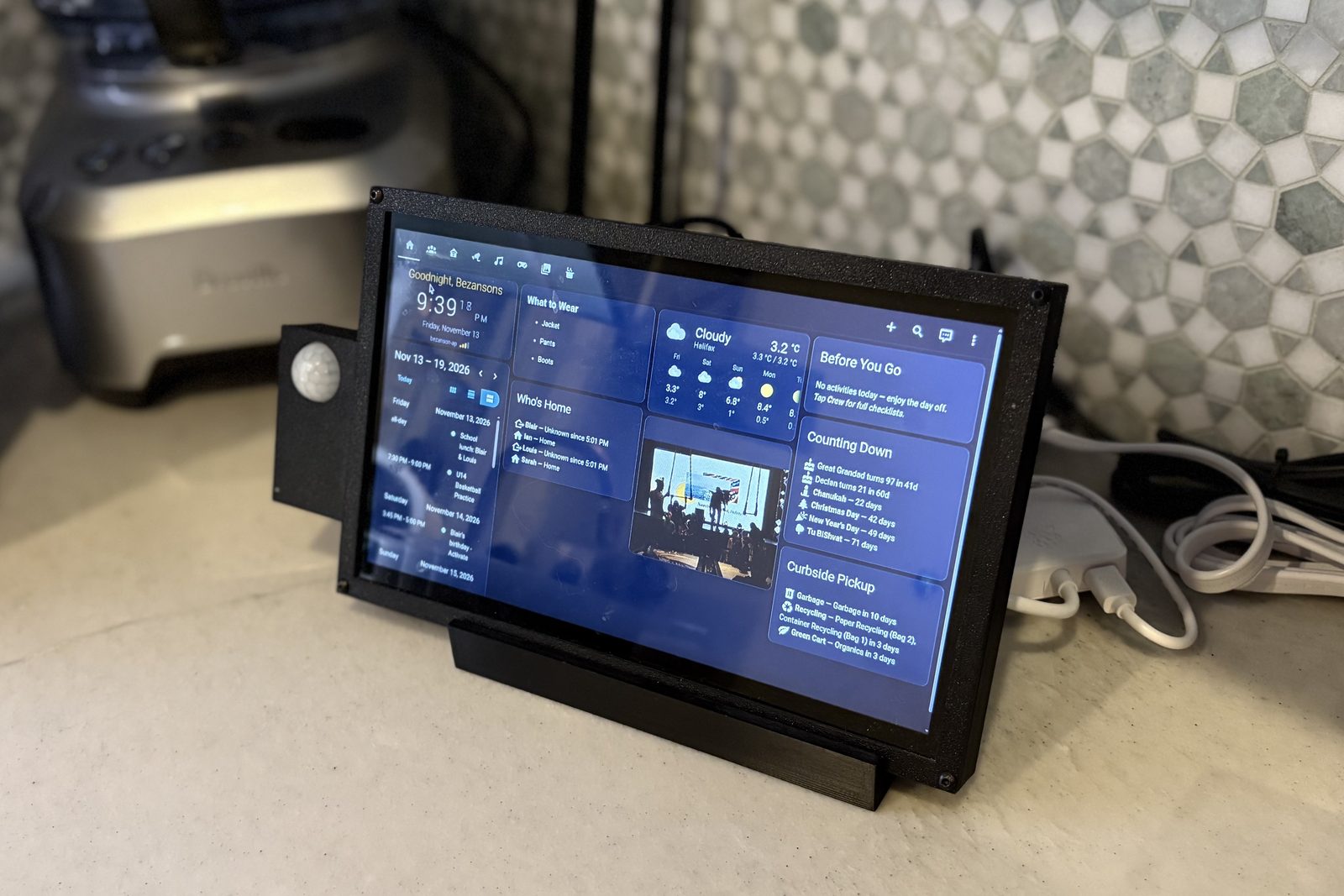
The first version
Every time we visited friends who have a Google Nest Hub, I thought it was the coolest little device. I had a spare Raspberry Pi (a small, cheap computer about the size of a deck of cards) and a tiny touchscreen, so I 3D-printed a case and stand for both and got to work.
About a year ago I set it up with MagicMirror, a free dashboard you can run on a Pi, mostly on my own with a little help from Gemini. It was okay, but it was kind of flaky, and the kids didn't use it the way I'd hoped.
Starting over on Home Assistant
The second version is built on Home Assistant, free home automation software that runs on an always-on computer in our house. Bosun itself is a Home Assistant dashboard, shown full screen in a web browser on the Pi, and the games and recipe pages are small web pages the AI wrote to sit inside it. We started with what the family would look at every day: the time and weather, the calendar, family photos, the boys' morning checklists, and a few games to keep them interested. The motion sensor from the first version came along, so the screen still turns off when nobody's around and wakes when someone walks by.
The boys already had paper checklists for school mornings, with "Where am I going" and "What do I need" at the top, and Bosun replaced them. We keep a spreadsheet of activities and what each one needs, like a jersey, shorts and a water bottle for basketball. Every five minutes, Bosun reads each boy's calendar and builds his list for the day on the Crew page.
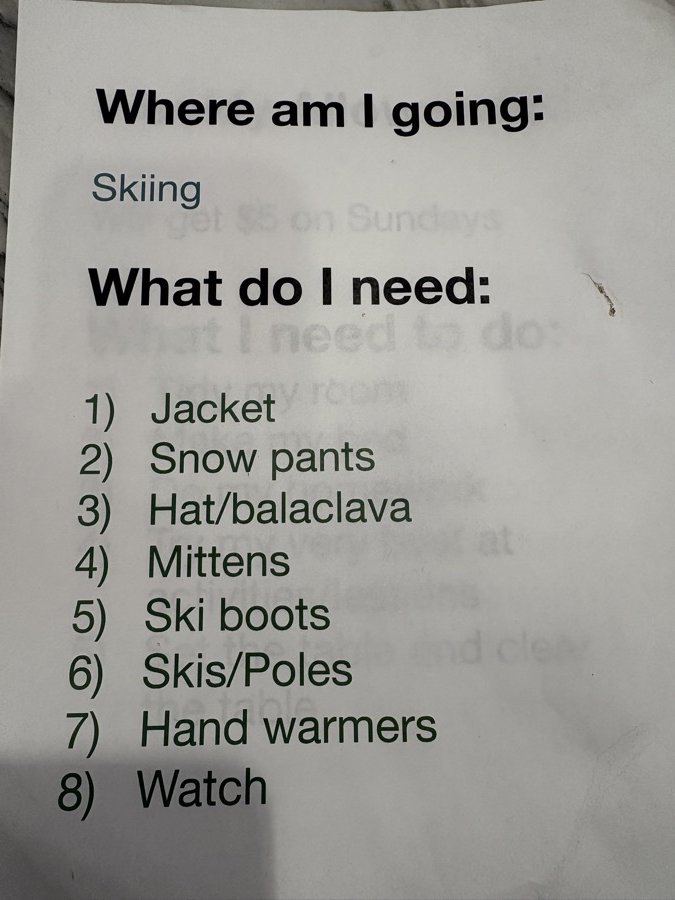
The checklists had a rough start: on May 4 I told the AI that "the past 2 mornings haven't shown anything for the kids," and it took three more days of fixes before the boys' lists were back.
My wife asked why the time wasn't on the screen while the family photos were showing, so now there's a bar along the top of most pages with the time, the date and the Wi-Fi signal.
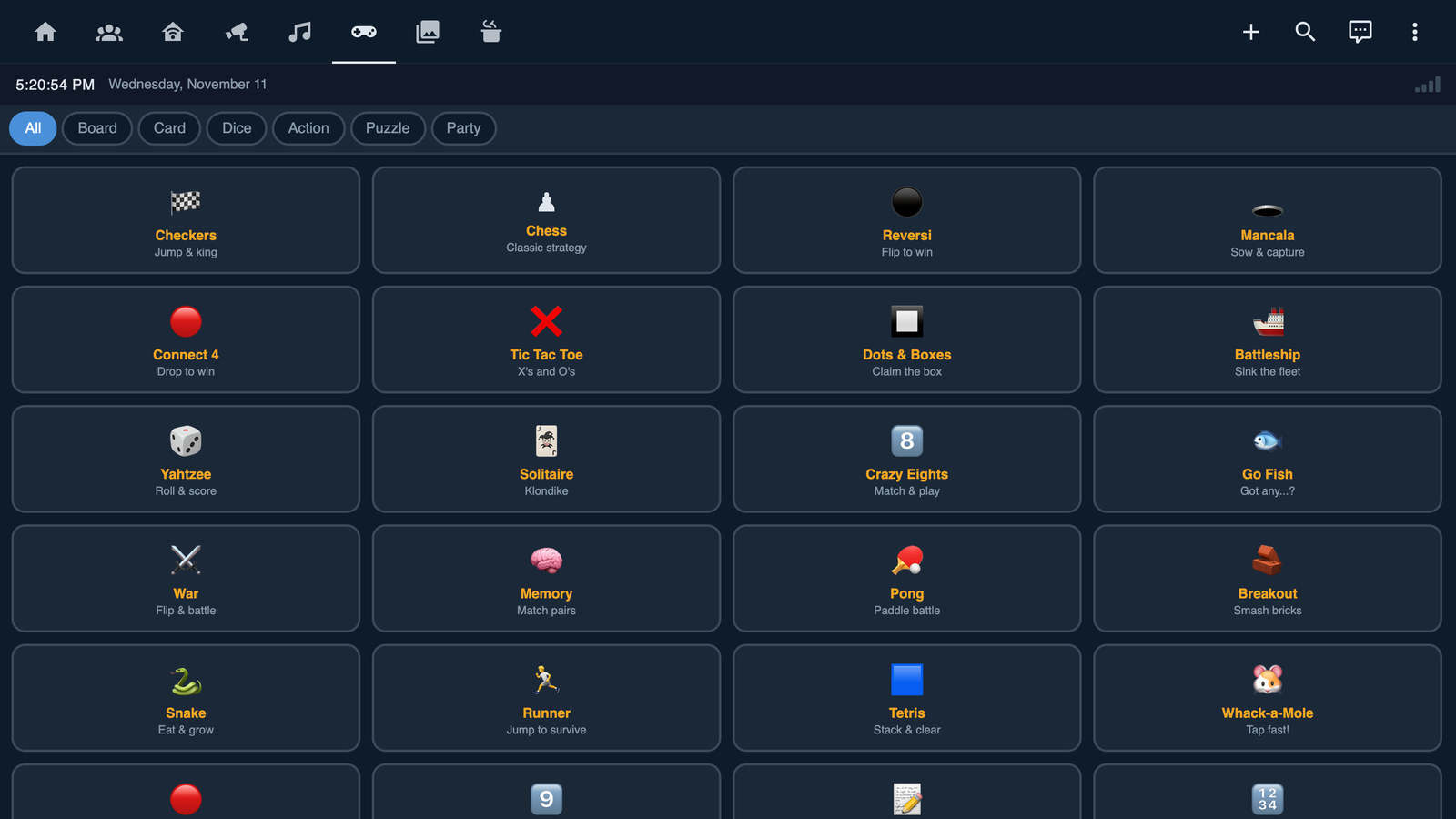
The games came from what we already played. In early April I told the AI that "The kids, my wife and I love a bunch of games in cardgames.io," and that "no one is into 2048." The AI wrote each game as its own small web page, and the Arcade has 24 of them now, including 14 board, card and dice games, some with a computer opponent. My youngest clicked the wrong line on the Yahtzee scorecard a couple of times because the rows were too small to tap. I asked for a rebuild, and the new scorecard has big buttons and room for up to four players or a game against the computer.
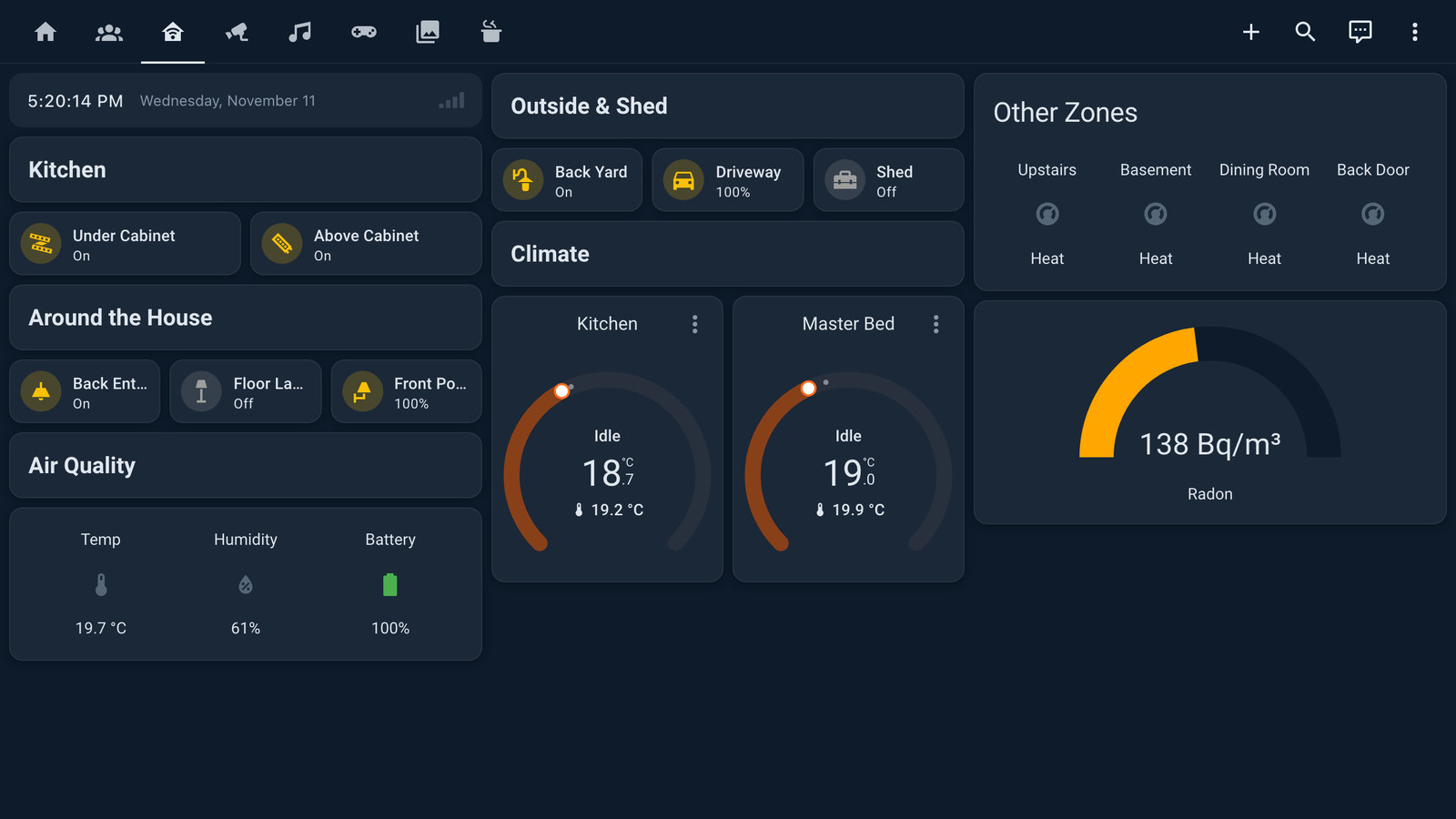
Later we added the lights and thermostats, which now have a page of their own.
Living with it
Not all of it went smoothly, mind you. A lot of features got to the point where we'd say "let's stop here and just use it for a bit," and that's where the problems showed up.
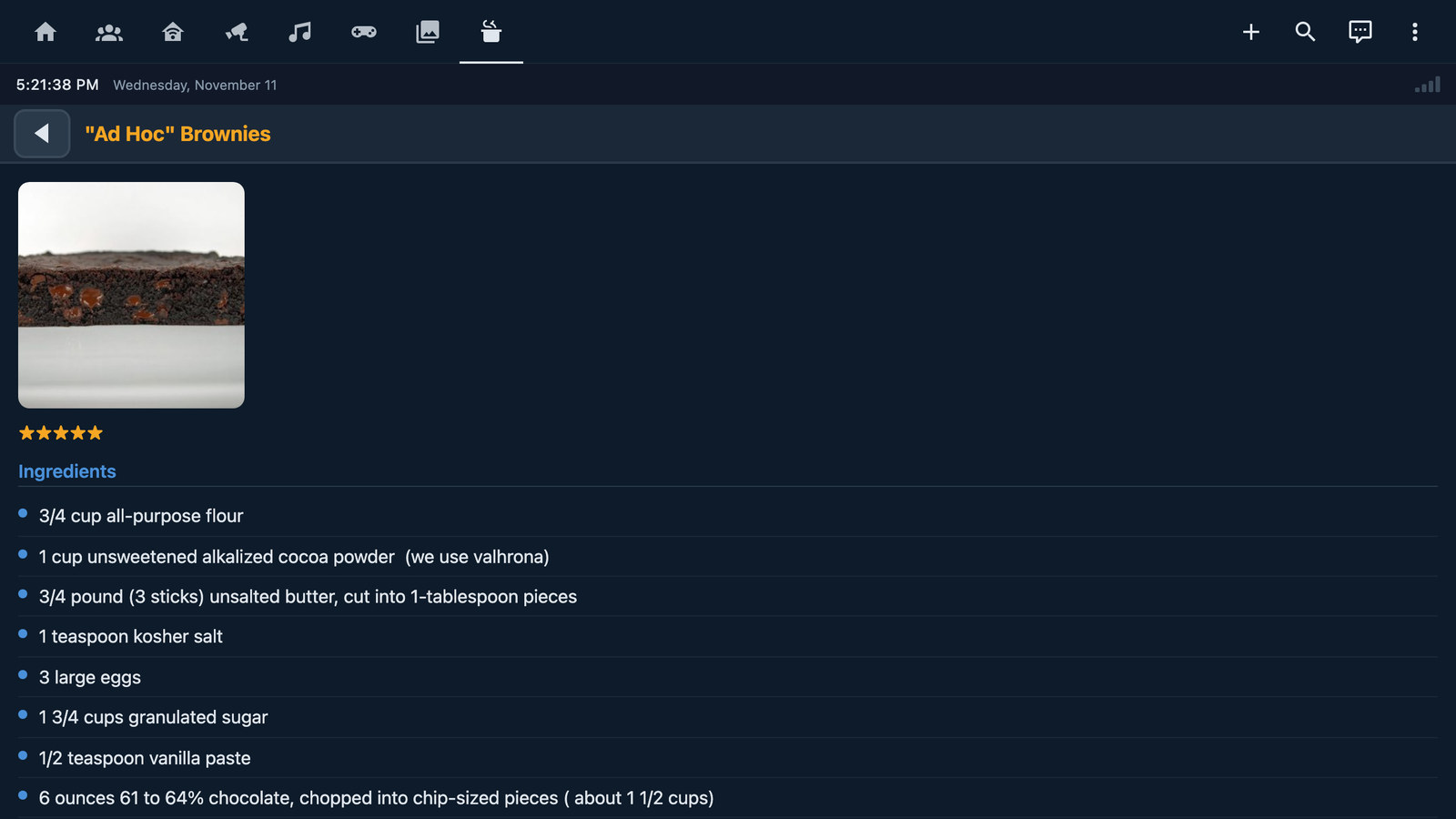
Our recipe system may have been the biggest pain in the ass to get right. The Galley page imports the 158 recipes from my Paprika app, and it went in on April 4. Three days later I reported that dragging a finger highlighted text instead of scrolling. The AI stopped the highlighting, but then dragging didn't scroll at all, and by May 4 it was "no drag and scroll at all. zero stars out of five."
Bosun sat mostly untouched from May to September, so part of that delay was me. On September 27 the AI put a test page on the kitchen screen, and when I dragged my finger around on it, the page counted 473 mouse movements and not a single touch. Our touchscreen tells the computer it's a mouse, so the April fix and another one in early September had both been waiting for touches that never came. What had looked like scrolling was the browser dragging a text selection down the page.
Fixing that turned up two more problems the same day. A fast flick threw the list back where it started, because the scrolling momentum ran backwards. Then tapping a recipe highlighted it without opening it, because the new scrolling code grabbed my finger the moment it touched the screen. The final fix waits until a finger moves before treating it as a scroll.
Some mornings I came down to a bare desktop instead of Bosun, and a 4 a.m. browser restart didn't fix it. The Pi waited for our server to answer before it opened the browser at all, so if it restarted overnight while the server wasn't answering, it stayed on the bare desktop. In September, Cursor wrote a fix that opens the browser right away on a small "waiting for the server" page, which switches to Bosun once the server answers. Two weeks later Claude Code tested that page on the Pi before it went live and found it could never switch over, so it fixed that too.
The rest was hardware: the Pi's built-in Wi-Fi was too weak to use in the kitchen, so it runs on a USB Wi-Fi adapter now, and the screen flickered until we swapped an old iPhone charger for the official Raspberry Pi power supply.
Getting the doorbell right
I asked for the announcement on October 17 and planned to "test doorbell in general tomorrow and doorbell when playing musak." The next night I wrote, "Doorbell alert did not work, FYI." The first version saved whatever the speakers were playing, made the announcement, then put the music back, and with music on those steps tripped over each other. It was rebuilt the same day to use Sonos's own announcement feature, which plays over the music.
After a week of living with the new version, I sent the AI a list of five things on October 24, and three were about the doorbell:
ok, we've run the updated bosun for the past week and I have some feedback:
- We should also alert at least Office Speaker about the doorbell(s)
- We should wait maybe 10s before we make doorbell announcements
- Do we flip and show the camera of the rang doorbell onscreen with an X when one rings?
The AI answered with a plan in phases and waited for my go-ahead before changing anything. After each change, it asked me to ring the doorbell and tell it what I heard and saw, and it only saved the work once I'd confirmed it.
The office speaker went in that day, but ten seconds turned out to be "way too long." My reply that evening explains why I'd wanted a delay at all: "It was just happening initially at the same time as the chime itself, so you couldn't really hear it. But now it's lonnnnng after." We settled on two seconds, and the announcement skips the speakers in the boys' bedrooms.
Item 3 is now a camera popup: when either doorbell rings, Bosun covers whatever page is showing with a live view from that door's camera and a big X to close it. If nobody taps the X, the popup closes itself after two minutes.
The kids' Among Us board
Our kids and their friends play Among Us in real life when they get together. In the video game, crewmates run around a spaceship doing small tasks. At our place, the tasks are stations set up around the house. The kids kept homemade spreadsheets to track who'd done what, and setting those up usually meant asking us for help.
On October 17 I asked for "an easy to make checklist" for them, and that night I reported that the first version "didn't cut it at all." Its "Add item" button did nothing, because the screen has no usable pop-up keyboard. I'd called that keyboard "just about the worst UI I've ever seen" back in April, and the project notes said so, which the AI owned right away: "I put a text input on a keyboard-less kiosk and didn't check." The list was also the wrong shape for how they play. As I told the AI, the kids "add tasks and then each of their friends and each come back to check the box for each tackling a task. Kind of a spreadsheet for kids for a game."
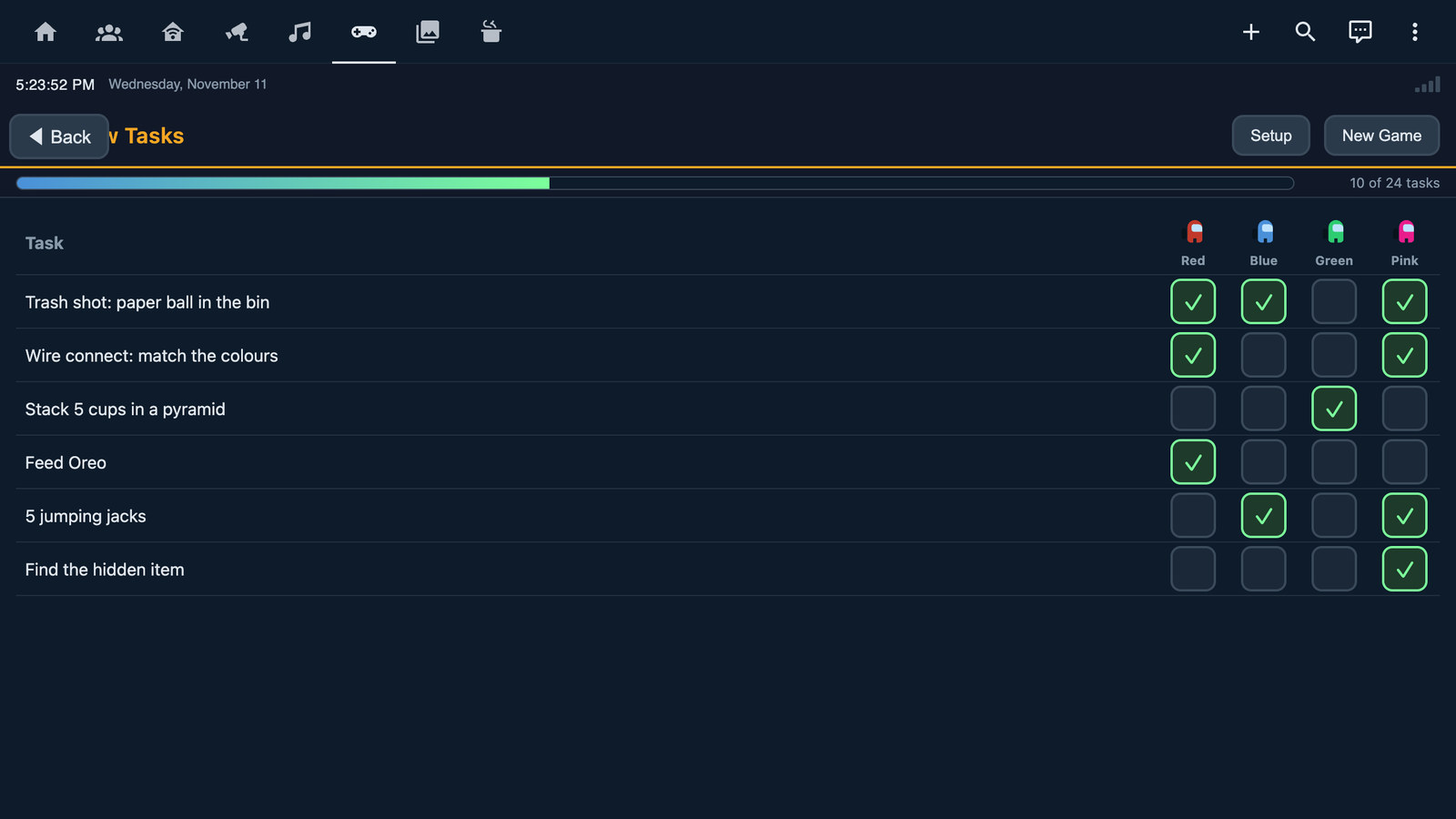
The next day's version, Crew Tasks, is a grid with tasks down the side, crewmates across the top, and a box to tick for each pair. It has its own big-key keyboard for names and 16 ready-made tasks, like "Trash shot: paper ball in the bin" and "Stack 5 cups in a pyramid." A progress bar along the top shows how many tasks the whole crew has finished. New Game clears the ticks and keeps the crew and the tasks, since the same group usually plays a few rounds in a row. The kids have started using it, but they're annoyed that the keyboard doesn't do capital letters yet.
What I'd do again
If you're building something like this for your own family, here's what I'd keep:
- Ask the people who'll use it what would help them, and build that first.
- Start with things people already check every day, like the clock, the weather and the morning checklists.
- Use it for a week before adding more, and write down what bugs you as it happens.
- Hand the AI the whole list in one message, in plain words, with what you saw and where.
- Keep a running notes file with the code, so each new conversation with the AI picks up where the last one stopped. I wrote about why in The Conversation Is Disposable. The Context Is Not.
Here's a cleaned-up version of my October 24 message that you can copy:
We've used [the thing] for the past week. Here's what we noticed:
1. [What happened, when, and who noticed]
2. [Something that's missing or annoying]
3. [An idea, written as a question]
Otherwise, [what's working well].

For each item, tell me what you think is causing it and what you'd change.
Wait for my OK before you build anything.